Proxy Guide
zoe18.0K views
WHAT IS A PROXY?
A Proxy / Proxy Server is a computer server that is created to move internet packets from and to a user, usually for obfuscating uses.
A proxy server is based around it’s IP address. When connecting to a proxy your device sends regular request like it would if the proxy didn't exist, but it would forward all of it’s requests through that proxy and the proxy will take the requests, and reroute them through it’s own IP address, and if obfuscated (anonymous) it will hide your IP address, and replace it with it’s own address instead, however the obfuscation isn't perfect and there are ways to detect your real IP address
THE USES OF A PROXY:
Proxies are most often used for hiding a user's real IP address, whether for privacy or to manage multiple accounts on a social network.
THE DIFFERENCE BETWEEN A PROXY & VPN
To discuss the difference between a proxy and a VPN we must first differ between a VPN and a VPN provider, as the two are almost always mixed up. A VPN provider is, in the simplest way, somebody who runs a network of multiple VPN Servers (usually hundreds to thousands) and allows users access to their entire network, meaning they can connect to any of their VPN servers whenever they wish to. On the other hand, a VPN or a VPN Server is a server that establishes secure, encrypted connection tunnel, forwarding packets from and to the user, kind of like a proxy but a little different. Now for the difference between a VPN and a proxy, the main thing is that for a VPN no one can see what websites you are browsing or what is your activity on the internet, not even your ISP, but with a Proxy anyone monitoring your connection can see your internet traffic as in what websites you're visiting and what exactly is it you're doing on these websites, however when using a TLS/SSL encryption (we'll discuss TLS/SSL further later on) an ISP or someone monitoring your connection can't tell what exactly you're doing on a website, they can just tell you're visiting that site, however somebody with experience who can perform a Man In The Middle Attack, can easily decrypt your connection to the proxy, so if you're privacy conscious it is always suggested you go with a VPN.
ALL TYPES OF PROXIES
Proxies generally have 2 types, SOCKS and HTTP, further broken down into SOCKS4 and SOCKS5, being two versions of the same technology and HTTP being HTTP and HTTPS where the "S" means that connection is encrypted with TLS/SSL encryption, all of these are very similar except they handle requests a little differently, it's always better to stick with HTTP proxies for internet marketers since SOCKS don't offer any particular advantage for us, and are less common supported. If you plan to use SOCKS for whatever reason just make sure the software you're using can handle SOCKS proxies.
EXTRA PROXY KNOWLEDGE (ADV)
4G or LTE, also sometimes called mobile proxies, are proxies created from connecting sim cards using what’s called a SIM bank or a 4G router, these can also be considered residential if the provider is honest. I have seen providers create regular rotating proxies and call them 4G, the only way to tell is to ask the provider, or check the ISP, these most often have East European, and Eurasian (Ukraine, Russia, Kazakhstan, etc.) ISPs as they are not very strict with SIM cards. Sometimes free VPN companies offer 4G/mobile proxies as separate from WIFI, since free VPNs are most commonly used on mobile devices. There’s no real practical way to tell if a provider is honest, as there’s no way differentiate between a connection coming from a 4G connection or a DSL/cable/WiFi one.
EXTRA PROXY KNOWLEDGE (ADV)
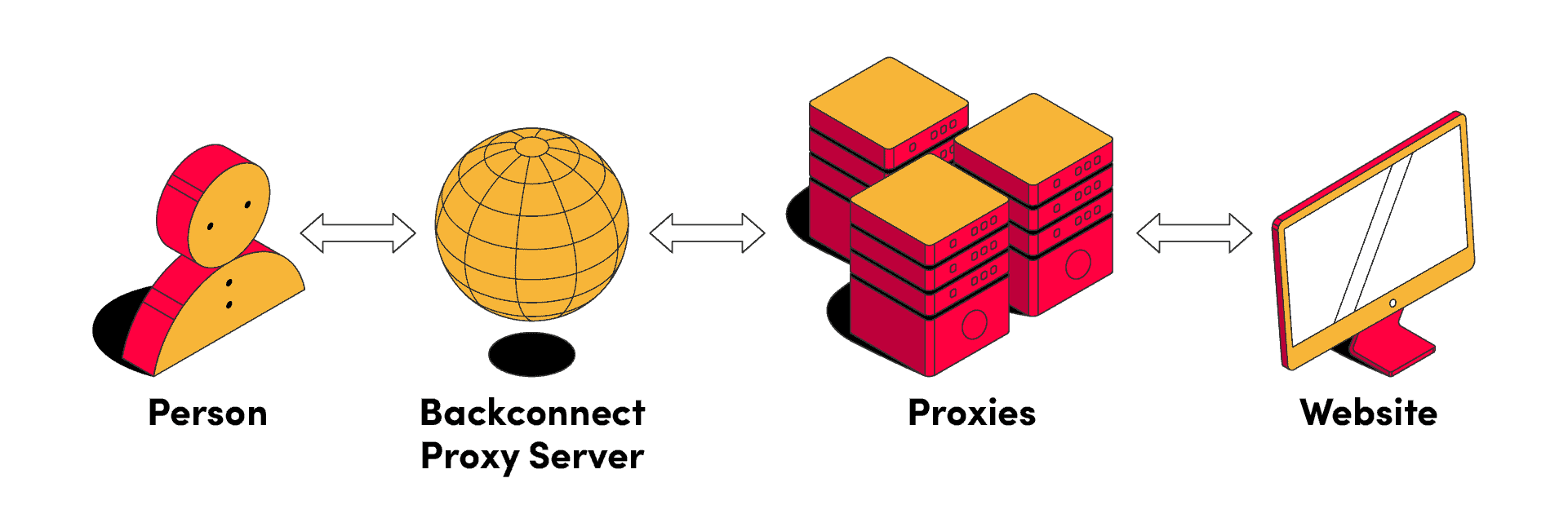
Rotating proxy means that the IP address will change every specified interval, or after X number of requests. It could be a proxy that changes IP every 120 seconds, or one that changes after every HTTP request you send. Rotating proxies can be very useful in preventing an IP address or subnet from getting flagged as suspicious, of course, this would depend on if the IPs are in the same subnet or not. It’s mostly useful for web scraping and account creation. Most homes use some form of rotating IP addresses, as once you restart your home router, you’ll get a new IP, also called dynamic IP. Rotating proxies use what is called “backconnect”, meaning you get a static IP to connect to and in the back end, it’ll be a different IP that changes per your setting so that you don’t have to changes the proxy details every time the IP address changes or rotates. Before you get such a proxy, make sure you know the size of the IP pool, how many subnets does the pool contain and what’s the proxy changing interval or trigger. The opposite of rotating would be static IP, this IP is allocated to a specific router or machine and will not change, unless a network admin changes it. Static IPs are mostly used by businesses for technical and security purposes.
Residential proxies, the supposed holy grail of proxies, and where it’s the easiest to rip users off, different people define “Residential” in different ways, feel free to pick any as there’s no agreed upon definition out there. The way I see it, a residential IP address is any IP address that exists in a subnet allocated for residential-only use and is actively used by normal people, and this is likely how IP intelligence companies and social networks define it as well, I can’t say for sure since there’s no public information about it.
Proxy List
Elusivensocksdetect expertConnect
Community
13,374members· 1,718 online
New posts, drops, and announcements land here first. Join and the bot notifies you the moment they go live.